

A smooth pharmacy shift isn’t necessarily a quiet one. Phones still ring. E-prescriptions arrive. Deliveries need to leave on time. The difference is that every task has a clear place to go, and the pharmacy team can see what needs attention without retracing the same steps.
That’s the kind of daily rhythm Timothy Zuch has been building with BestRx. Zuch is the owner and a pharmacist at Sloan’s Pharmacy in Mount Joy, Pennsylvania. The first Sloan’s location migrated to BestRx in May 2025, and his team now uses features such as Auto Process, NightTech, Verify Before Dispense, electronic data interchange (EDI), messaging, secure faxing, partial fills, and customized queues and workflows throughout the day.
No two independent pharmacies operate exactly alike, but the following day-in-the-life shows how a pharmacy manager can use BestRx pharmacy management software to reduce manual work, keep prescriptions moving, and give the team more time for patient care.
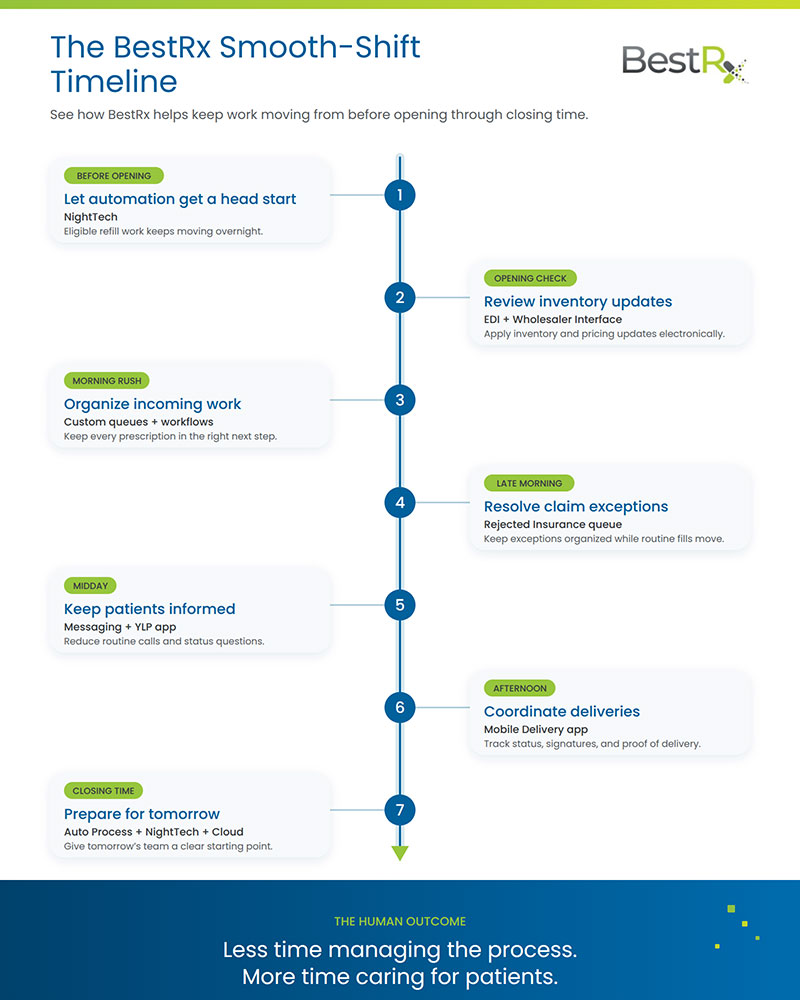
The day can begin before the first employee arrives.
With NightTech enabled, selected refill work can continue overnight. This BestRx feature can move eligible prescriptions through verification, transmit claims, and print labels based on the pharmacy’s settings. When the team opens the store, they aren’t starting from a blank screen. They can begin with prescriptions that are ready for the next step and focus on the items that require human judgment.
During business hours, Auto Process and autofill settings can provide similar support in the background. Instead of moving every eligible refill forward one at a time, the pharmacy can automate portions of the workflow while staff members continue serving patients and handling exceptions.
For Zuch, these automated features are among the most valuable parts of BestRx because they eliminate a meaningful amount of manual effort. His advice is simple: take advantage of them. Automation doesn’t replace the pharmacist’s expertise. It clears repetitive work out of the way so expertise can be applied where it matters.
Once the pharmacy is open, inventory is one of the first areas worth checking. A missing product can interrupt several prescriptions at once, while an unnoticed pricing or quantity change can create additional work later.
BestRx’s Wholesaler Interface uses EDI to bring wholesaler files into a dedicated inbox. The pharmacy can then apply inventory and pricing updates electronically instead of entering each change by hand. Inventory reports and purchasing information also help the manager identify what’s available, what needs to be reordered, and which prescriptions may be waiting on a delivery.
This is where a well-designed queue becomes especially useful. Zuch recommends creating an “Rx Awaiting Drug From Wholesaler” queue. If one medication is delayed, the team can place all of the patient’s related prescriptions in that queue rather than allowing part of the order to advance without the rest. When the product arrives, staff can quickly find the affected prescriptions and move the entire order forward.
That small workflow choice can prevent repeated searches, incomplete pickups, and confusing status updates for patients.
As e-prescriptions, refill requests, phone calls, and walk-ins begin arriving, the challenge is no longer finding work. It’s knowing what should happen next.
Customizable Workflows allow a pharmacy to organize prescription tasks around the way its team actually operates. Zuch recommends configuring the right queues as early as possible, including:
These queues give exceptions a defined destination. A rejected claim doesn’t disappear into the general workload. A future fill doesn’t need to be remembered on a sticky note. A prescription waiting for inventory remains visible without blocking unrelated work.
Partial-fill tools can help the team manage situations in which the pharmacy cannot dispense the full quantity immediately. Verify Before Dispense adds another checkpoint before the prescription is completed. Keyboard shortcuts, fewer screen changes, and quick navigation help staff work through these steps without losing their place.
Zuch said this combination has helped his team complete tasks more efficiently and accurately because it removes manual effort and streamlines the workflow. In a busy pharmacy, fewer unnecessary clicks may seem like a small improvement. Repeated across hundreds of prescriptions, they can shape the entire shift.
Insurance rejections are a normal part of pharmacy operations, but they don’t need to derail the main filling workflow.
With a dedicated Rejected Insurance queue, the team can separate claims that require follow-up from prescriptions that can continue moving. Staff can review the rejection, gather the necessary information, contact the prescriber or payer when appropriate, and return the prescription to the workflow once the issue is addressed.
BestRx also offers automated prescription claims processing through integrated pre- and post-editing tools. These tools assess claims and provide actionable messages that can help the pharmacy identify submission issues and make informed decisions. The pharmacist remains responsible for reviewing the situation, but the system can make the exception easier to spot and act on.
The benefit is not simply faster claim resolution. It’s a calmer workflow. Routine prescriptions can keep moving while exceptions remain organized and visible.
Patients want to know whether a prescription is ready, delayed, or waiting for action. When every update requires a phone call, those short conversations can consume a surprising amount of the team’s day.
BestRx Patient Engagement tools support automated and two-way text messaging. At Sloan’s, Zuch especially values the text notification sent after Verify Before Dispense because it lets the patient know the prescription is ready for pickup. The update reaches the patient without requiring a staff member to stop, dial, leave a voicemail, and document the call.
Patients can also use the Your Local Pharmacy app to request refills, check prescription status, send messages, and help manage medications for loved ones. Incoming refill requests can enter the pharmacy’s regular refill queue, keeping the patient-facing experience connected to the team’s existing process.
When a document needs to be exchanged securely, BestRx also integrates with SRFax for HIPAA-compliant online faxing. Together, messaging, the patient app, and integrated faxing give the pharmacy several ways to communicate while reducing duplicate data entry.
“BestRx helps my team focus more on patient care than data entry while working through incoming prescriptions quickly, accurately, and efficiently.”
Timothy Zuch | Owner & Pharmacist, Sloan’s Pharmacy
For pharmacies that deliver, the workflow doesn’t end when the prescription is filled.
The BestRx cloud-based Mobile Delivery app can help staff organize deliveries, track their status, collect electronic signatures and proof of delivery, and securely send information back to the pharmacy. Depending on the pharmacy’s setup, the app can also support real-time payments and deliveries from multiple locations.
Because the delivery status is connected to the pharmacy’s system, staff can answer patient questions without chasing down paper manifests or calling the driver for every update. Electronic records also make it easier to confirm what was delivered and when.
For the pharmacy manager, that visibility helps keep counter, workflow, and delivery teams working from the same information.
A smooth close is less about finishing every possible task and more about making sure nothing important becomes invisible overnight.
Before leaving, the pharmacy manager can review the active queues, confirm that deferred prescriptions have the right dates, check unresolved claim and inventory exceptions, and prepare eligible refill work for NightTech. The team can also make sure delivery records and patient communications are complete.
For owners who need access beyond a single workstation or location, BestRx offers cloud solutions for independent pharmacies, including cloud-hosted software and remote tools for reporting and, where permitted, central verification. Zuch recommends exploring the cloud option as part of a pharmacy’s continuity and access strategy.
Then the cycle starts again, with overnight automation helping tomorrow’s shift begin a few steps ahead.
BestRx can streamline a pharmacy’s daily workflows, but good software still benefits from thoughtful setup and training. Zuch encourages new users to allow time to learn a different system, configure their queues early, and use BestRx’s training videos and support resources. There may be a learning curve, he said, but it’s worth it.
The goal isn’t to make the day less human. It’s to reduce the manual steps that pull pharmacists away from people. When refill automation, inventory updates, claim exceptions, patient messages, and deliveries each have a clear path, the pharmacy team can spend less time managing the process and more time caring for the community.
Want to see how these workflows could fit your pharmacy? Request a free BestRx demo to explore the features and configure a system around the way your team works.