
Every independent pharmacy owner wants the same thing from technology: a system that helps them care for patients, simplify operations, and grow the business. Plenty of vendors promise exactly that. The harder question is what you’ll actually pay, in money, time, and frustration, to get it.
Searching for the best pharmacy software often leads to a feature checklist and a price quote. But the lowest quote isn’t always the most affordable pharmacy software, and the longest feature list isn’t always the best fit. Real affordability comes from total value: what the system costs over time compared with what it saves and earns your pharmacy.
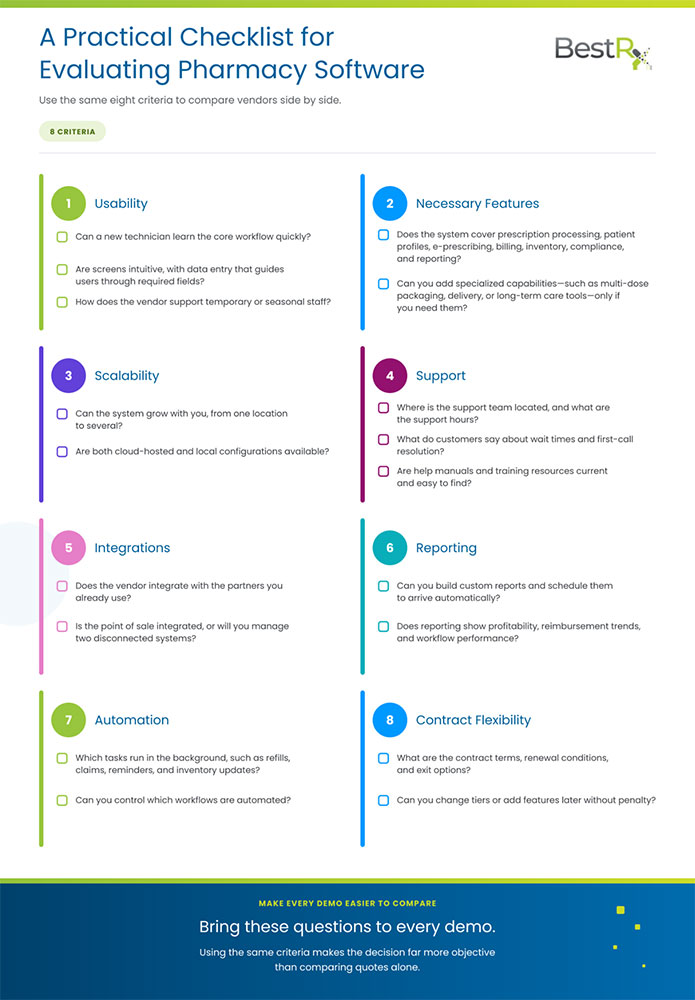
This guide gives you a practical way to evaluate that value, along with a checklist you can take into any vendor demo.
Many pharmacies assume they face a two-way choice:
Both can become expensive. The first can lock you into paying for capabilities you don’t need. The second can cost you in workarounds, manual tasks, and downtime. The better question is: what will this system cost me, and what will it return, over the next several years?
The monthly subscription is only one line item. When comparing pharmacy management systems, ask about the full picture:
That last item is often the biggest hidden factor. If a system saves each team member even a few minutes per prescription, those minutes add up to hours every week. Software that costs a little more but eliminates repetitive work can be the more affordable choice.
Software price matters, but workflow design determines whether you actually get a return on it. Features that reduce friction tend to pay back quickly:
Each of these removes manual steps, and fewer manual steps mean fewer errors and more time for patient care.
If you’re comparing pharmacy management systems with built-in point-of-sale capabilities, integration should be a priority. When your prescription system and POS share data, you reduce pricing errors, inventory mismatches, and missing records. You also give patients a faster checkout and give yourself a clearer view of overall pharmacy performance.
BestPOS is designed to work seamlessly with BestRx, connecting the prescription counter to the front of the store. Prescription and retail stock are tracked in the same place, with inventory updating automatically every time something sells.
BestRx is built exclusively for independent pharmacies, and its approach to value centers on flexibility and fit.
You can see how all of these pieces fit together in the BestRx pharmacy management system overview.
Ease of use directly affects cost, because the less time your team spends learning and troubleshooting, the more time they spend serving patients.
“BestRx is the only software I’ll ever use at my pharmacy because it’s extremely user-friendly. In fact, I myself work at the pharmacy 7 days a week. On the occasional days I need to use temporary help, I never have to worry about whether they’ll be able to use/learn the system.”
– Nisha P., Pharmacy Owner
For pharmacies considering the cloud, another customer shared how the move changed day-to-day flexibility:
“...the cloud-based system takes it a step further, eliminating the challenge of being tied to a physical server. Since transitioning, we’ve enjoyed the increased flexibility and scalability associated with remote access.”
– Perry K., IntegraRx
Rather than relying on claims, ask each provider the same direct questions:
For an independent pharmacy, value isn’t the lowest price or the longest feature list. It’s a system that’s easy for your team to learn, flexible enough to fit how you work, supported by people who answer when you call, and priced so you only pay for what you use. When those pieces come together, software stops being an expense and becomes a driver of efficiency and growth.
The best way to judge fit is to see it in action.
Schedule a personalized BestRx demo to walk through your workflow, your must-have features, and your budget with a team that understands independent pharmacies.
The best option depends on your size, workflow, and budget, but strong systems share common traits. Look for software built specifically for independents, with an intuitive interface, customizable workflows, integrated e-prescribing and billing, solid reporting, and accessible support. Compare vendors using the same evaluation criteria and request a demo tailored to your pharmacy. BestRx is designed exclusively for independent pharmacies.
The best POS is one that shares data in real time with your pharmacy management system, so prescription and retail inventory, pricing, and sales stay aligned. Integrated systems help reduce pricing errors and speed up checkout. BestPOS integrates with BestRx to connect the prescription counter and the front of the store.
Flexibility usually means tiered service levels, optional features, and the freedom to choose your hardware and setup. When comparing vendors, ask what’s included in each tier, what costs extra, and what the contract terms are. BestRx offers flexible options so pharmacies can select the features they need now and add more as they grow.
Look for a system where the POS and pharmacy software work as a connected solution rather than separate programs. Key benefits include automatic inventory updates, fewer pricing mismatches, faster checkout, and unified reporting across prescription and retail sales. BestRx and BestPOS work together for this front-to-back approach.
Evaluate support on specifics: location, hours, wait times, resolution speed, and the quality of training materials and help manuals. Ask for references from pharmacies similar to yours. BestRx features a U.S.-based support team with extended helpline hours and online help manuals.
Not necessarily. A low subscription price can be offset by manual workarounds, limited support, slow updates, or extra fees for integrations. Total cost of ownership, which includes conversion, hardware, training, support, and staff time, gives a more accurate picture of affordability.
Both have advantages. Cloud-hosted systems can offer remote access and flexibility without tying you to a physical server, while local configurations may suit pharmacies with specific infrastructure preferences. BestRx offers both cloud and local setup options.
Timelines vary based on your data and current vendor. Review the vendor’s conversion process, ask what’s included in the cost, and plan training for your team. The BestRx conversion guide outlines the process for switching.