
Running one independent pharmacy requires constant attention. When you operate several locations, the number of decisions grows quickly:
Getting those answers shouldn’t require driving from store to store, logging into separate systems, or asking managers to assemble spreadsheets. By the time the information reaches you, the situation may have already changed.
Centralized pharmacy reporting gives multi-store owners a clearer, more timely view of the entire business. With the right pharmacy reporting software, you can review individual locations, compare selected stores, and monitor company-wide performance without being physically present at every pharmacy.
The goal isn’t to replace conversations with store managers. It’s to make those conversations more productive by giving everyone access to consistent information.
Distance is an obvious challenge for multi-store pharmacy owners, but fragmented information may be the bigger problem. Each location generates prescription, inventory, sales, workflow, staffing, and financial data throughout the day. If that information stays isolated within individual stores, it’s difficult to see what’s happening across the business.
Owners may spend hours visiting locations, requesting reports, comparing different date ranges, and trying to reconcile numbers from separate sources. Managers may also use different processes for tracking performance, which can make store-to-store comparisons unreliable. A location that appears to be underperforming may simply be using a different report or reviewing a different period.
In-person visits are still valuable. They help owners understand team dynamics, workflow challenges, and patient needs that won’t always appear in a report. However, travel shouldn’t be the only way to discover an inventory issue, reimbursement concern, or operational bottleneck. A centralized pharmacy reporting system can surface those issues earlier so owners know where their attention is needed most.
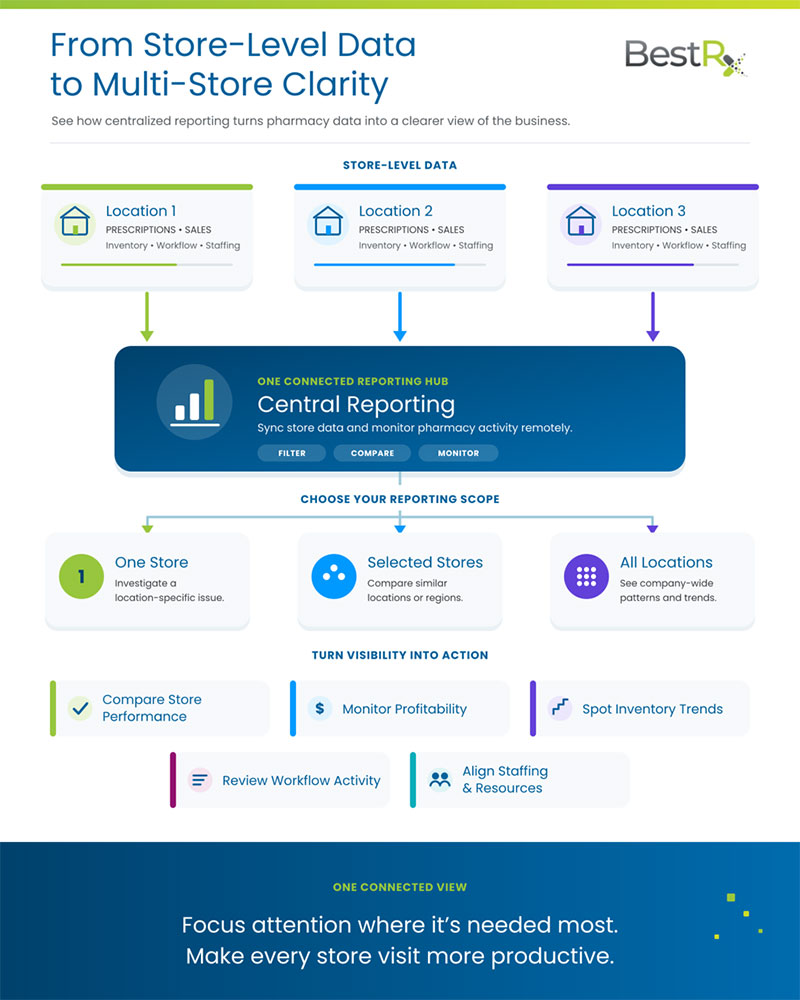
Centralized pharmacy reporting brings operational data from multiple pharmacy locations into one accessible reporting environment. Instead of reviewing each store separately, authorized users can examine information for one location, a selected group of stores, or the entire organization.
BestRx’s Central Reporting tools sync store data to the cloud and provide remote access through an online portal. Reports can be filtered to focus on the locations and information most relevant to a particular question. An owner might review one store after an unusual sales day, compare two similarly sized locations, or look at all pharmacies to understand the business’s overall direction.
That flexibility makes centralized pharmacy reporting more than a convenience. It creates a consistent foundation for evaluating performance, discussing priorities with managers, and deciding where to investigate further.
The value of a pharmacy reporting system depends on whether it provides information you can use. For multi-location pharmacies, that typically means visibility into both patient-care workflows and the financial health of the business.
BestRx Central Reporting can help owners review information such as:
These pharmacy reporting tools can help answer practical questions. If prescription volume is increasing but profitability isn’t, reimbursement and acquisition-cost data may provide context. If one location frequently experiences inventory shortages, usage patterns may indicate whether purchasing levels need to change. If work repeatedly stalls at a certain stage, prescription statuses and workflow history can help identify where the delay occurs.
Reports shouldn’t be treated as isolated scorecards. One number rarely tells the full story. Store size, payer mix, staffing, patient demographics, seasonal demand, and local services can all affect performance. Reporting helps identify the right questions to ask. Store managers and pharmacy teams provide the operational context needed to answer them.
Collecting more data isn’t the goal. The real value comes from using reliable information to make faster, better-informed decisions across your locations.
Central reporting makes it easier to compare stores using the same metrics and date ranges. Owners can identify patterns, determine whether a change is isolated or widespread, and look more closely at locations that fall outside normal expectations.
Comparisons should account for the differences between stores. Rather than expecting every location to produce identical results, use reporting to establish appropriate benchmarks based on prescription volume, services, staffing, and local market conditions.
Small changes in reimbursement, acquisition costs, accounts receivable, or sales can have a significant effect when repeated across several locations. Regular reporting can help owners notice those changes before they become larger problems.
For example, low-reimbursement trends may reveal certain prescriptions or plans that need additional review. OTC sales data from an integrated system like BestPOS can also help owners understand which categories are performing well and where front-end inventory may need attention.
Inventory decisions become more complex when products are moving at different rates across several stores. Centralized reports can help owners compare usage, identify slow-moving items, and detect unusual patterns. That information can support more informed ordering decisions and reduce the likelihood of carrying unnecessary inventory at one location while another experiences shortages.
Reporting doesn’t make the purchasing decision for you. It gives you a clearer picture of demand so you can apply your knowledge of patients, prescribers, seasonal needs, and wholesaler requirements.
Prescription status, workflow history, and employee activity can help owners understand how work moves through each store. If one pharmacy consistently processes similar volume with fewer delays, its workflow may offer lessons that can be applied elsewhere.
The same data can also reveal when a location needs additional staffing, training, or process support. The objective isn’t to monitor employees for the sake of monitoring them. It’s to identify where teams may be carrying an uneven workload or working around a process that needs improvement.
Central Reporting and the BestRx Custom Report Builder are related, but they solve different reporting challenges.
Central Reporting gives multi-store owners cloud-based access to operational reports across one, several, or all locations. It’s useful when you need a consolidated view of pharmacy activity and want to compare performance without logging into each store separately.
The BestRx Custom Report Builder provides more flexibility when you need a report tailored to a particular question. Pharmacies can create reports for areas such as daily activity, low reimbursement, prescription utilization, refill reminders, employee actions, and changed or deleted prescriptions. Custom reports can also be scheduled for email delivery and exported in Excel, CSV, or text formats.
Used together, these pharmacy reporting tools support both high-level oversight and detailed investigation. Central Reporting may show that a trend exists across several stores, while a custom report can help you explore the specific patients, prescriptions, drugs, prescribers, or insurance plans associated with it.
There isn’t one universal “best” system for every pharmacy. An owner with one store may have different reporting needs than an organization operating five or ten locations. When comparing pharmacy reporting software, focus on whether the system supports the decisions your team regularly makes.
Useful capabilities to evaluate include:
When comparing top-rated cloud solutions for independent pharmacies with custom reporting needs, look beyond the total number of reports included. A long list of reports isn’t helpful if the information is difficult to access, can’t be filtered, or requires significant manual work before it becomes usable.
BestRx connects reporting with the same pharmacy management system pharmacies use for prescription processing, inventory, billing, patient information, and daily workflows. Keeping those functions connected can give owners a more complete view of performance while reducing the need to assemble information from disconnected programs.
Cloud access can make centralized reporting even more useful for owners who divide their time between locations. BestRx offers cloud solutions for independent pharmacies, including a cloud-hosted version of BestRx and BestPOS, as well as cloud-based tools for functions such as Central Reporting.
The cloud-hosted option provides remote access to the pharmacy’s management and point-of-sale systems, while Central Reporting focuses specifically on syncing store data and making operational reports available through an online portal. Pharmacies can choose the configuration that best matches their size, workflows, and access needs.
For a closer look at remote access, backups, scalability, and multi-location oversight, explore the benefits of cloud-based pharmacy software.
Managing multiple pharmacies will always require communication, leadership, and time in each store. Centralized pharmacy reporting helps owners use that time more intentionally. Instead of traveling to a location simply to find out what’s happening, you can arrive with a clearer understanding of its performance and a more focused list of questions.
Start by identifying the reports your business needs most. Establish a consistent review schedule, compare stores using appropriate benchmarks, and involve managers in interpreting the results. A pharmacy reporting system works best when it becomes part of a regular operating rhythm rather than something you open only after a problem occurs.
Ready to explore centralized reporting, custom pharmacy reports, and remote management tools for your stores? Request a free BestRx demo to see how BestRx can help you monitor performance across one or multiple pharmacy locations.